Comparison
Best Mobile Terminal in 2026? 9 Things to Look For
Nine practical checks for choosing a mobile terminal on iPhone, iPad, or Android, with TermRover demos and alternatives for different workflows.
For remote tmux work on a touchscreen, TermRover is my recommendation. It brings pane controls, text selection, voice input, and saved tabs into the everyday terminal workflow on iPhone, iPad, and Android. It also works well on an iPad with a hardware keyboard. If your priority is running shell tools locally on your device or managing servers with a team, the alternatives below may suit you better.
I build TermRover. These are the nine things I care about when using a mobile SSH terminal, illustrated with recordings from the app. Competitor features are linked to official sources, checked on 14 September 2026; this is a guide to choosing by workflow, not a measured performance ranking.
Jump to what matters to you:
- Everyday terminal experience
- tmux, Herdr, and pane-aware selection
- Working comfortably with agents
- Many agents across machines
- Multitasking and picking up where you left off
- Network switches and free Mosh
- Light and dark themes
- How easy is it to change font size?
- Hosts, SSH keys, and Tailscale
1. Does everyday terminal work feel good?
A good terminal experience is my top priority for TermRover, especially when working with a multiplexer. I want the terminal to feel fast, responsive, and comfortable on a phone. Keeping the app minimal is part of that: I say no to features that add clutter without making terminal work better.
The everyday interactions deserve the most attention:
- Keyboard: does tapping the terminal bring it up when you want to type?
- Resizing: when the keyboard opens or closes, does the terminal resize properly, including the multiplexer layout?
- Responsiveness: does typing feel immediate, and can you navigate and read output without the app slowing you down?
- Scrolling: can you swipe through tmux history without editing
.tmux.conffirst?
These are the details I build TermRover around. Terminal keys stay within reach above the keyboard. For tmux scrolling, TermRover offers a Turn on button when mouse mode is off: one tap enables it, with no configuration-file edit or reconnect. With a hardware keyboard, you can hide the quick rows and give more of the screen to the terminal.
2. Can you work with tmux and Herdr on a touchscreen?
Imagine an agent running in one pane and build output in another. You want to inspect the build, zoom its pane to read an error, then return to the split layout. A mobile terminal should make that sequence comfortable with your thumbs.
In TermRover, the multiplexer quick row puts frequent actions above the keyboard: split a pane, move between panes, zoom and unzoom, switch windows, and create a window. The session picker lets you attach to an existing session or create another, with favourites near the top. Choose tmux, Herdr, or Zellij per host, and the controls follow that choice. The multiplexer runs on your remote machine.
Try copying from just one pane. When the neighbouring pane is printing logs, an ordinary rectangular selection can pick up both outputs. TermRover’s pane-aware selection keeps the selection inside the pane you touched, so you can copy an agent’s response without the logs beside it.
Long-press a pane and choose Select. This works with Herdr and with tmux when mouse mode is enabled, on iPhone, iPad, and Android. The pane-selection walkthrough shows the handles and magnifying loupe in detail.
3. Can you work comfortably with agents?
You spot a layout bug on your phone. The useful message includes a screenshot, the steps that triggered it, and what you expected. Typing all of that into a terminal line with your thumbs gets old quickly.
TermRover lets you attach photos or videos, annotate a screenshot, and dictate a longer explanation into an editable composer. Review the wording, fix a filename, then send. Attachments upload to the remote host over SSH and their paths are inserted into the prompt; what the agent can do with an image or video depends on that agent’s media support.
This works alongside terminal agents such as Claude Code, Codex, and OpenCode. You keep using the agent in its remote terminal session, with more comfortable ways to provide context from your phone.
4. Can you work with many agents across machines?
One agent is working on your workstation, another on a server, and a third in a different project. Finding the right agent should not mean checking each machine in turn.
For agents spread across machines, Herdr Agents Fleet provides a separate view. Choose the saved hosts to include, see their Herdr agents together, and open an agent over SSH or Mosh—or open its surrounding workspace. Favourites and grouping by machine help you find the work you want. See how Fleet works.
5. Is it easy to multitask and pick up where you left off?
A shell on your server, an agent on your workstation, and another project in a separate session: switching between them should take less effort than remembering how you connected.
TermRover has browser-style tabs. Open a tab for a host or session, rename it, drag it into order, or pin it. Keep several sessions open and switch between them with a tap.
Your tabs are saved even if the app is killed. Restart TermRover and the tab strip comes back, so you can return to your sessions without rebuilding your workspace. TermRover remembers the tabs; tmux or Herdr keeps the work running on the remote host. Reconnecting requires that host to be reachable and the remote session to still be running.
6. Does your connection handle life on the move?
Leave home Wi-Fi, switch to cellular, then pass through a dead spot. A plain SSH connection can drop when the network changes. Mosh is designed to roam between networks and resume after connectivity returns.
TermRover includes Mosh for free. You can switch a running SSH tab to Mosh while keeping the attached multiplexer session. The existing SSH terminal stays available until the Mosh connection succeeds. Start working first and switch transport when you need it.
The host needs mosh-server, and the network must allow its UDP connection. Mosh is unavailable through TermRover’s SSH jump-host routes. The Mosh guide covers setup and how roaming differs from reconnecting to SSH.
7. Can you read the terminal outside and at night?
A dark theme that looks good indoors can be difficult to read in bright sunlight. A bright terminal can be uncomfortable at night. Working on the move means being able to choose a palette for the place you are in.
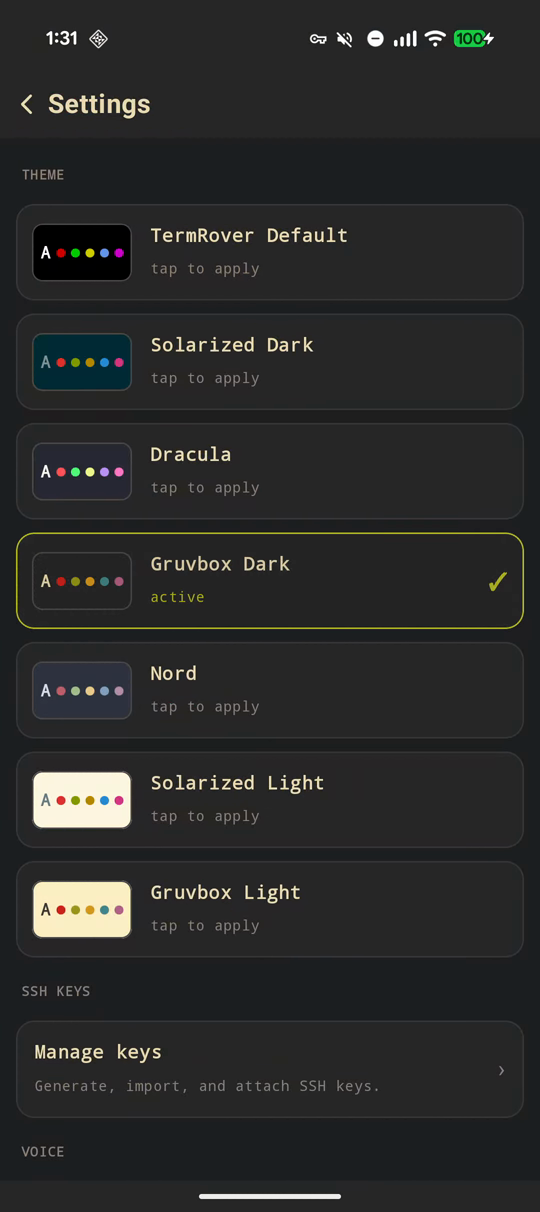
Look for both light and dark themes, and check the contrast of the output you actually read: error messages, comments, selection highlights, and pane borders. TermRover includes light and dark palettes such as Solarized and Gruvbox, and applies the theme to the terminal, keyboard bar, and surrounding app.
8. How easy is it to change font size?
Smaller text lets you fit more of a split-pane layout on screen. Larger text makes a long response easier to read. You may want both during the same session.
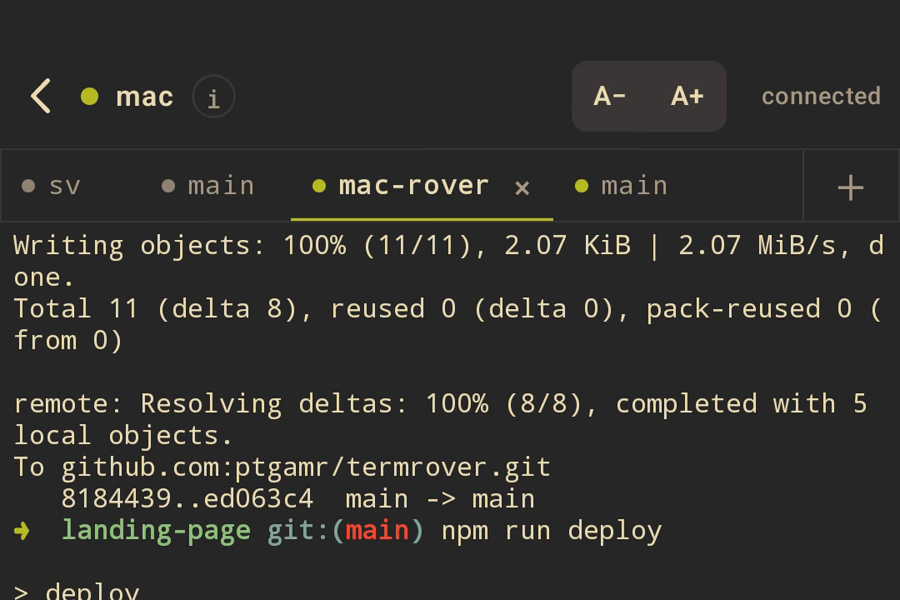
TermRover puts A− and A+ on every terminal view, so adjusting the text size is just one tap away. The setting is saved, and you never need to dig through Settings to change it.
9. How much effort does managing hosts and SSH keys take?
Adding a machine should not mean repeatedly copying addresses, usernames, and keys between devices. Check how a terminal saves hosts, lets you choose credentials, and helps you reach machines on a private network.
TermRover supports saved hosts and SSH keys, including generating or importing a key. If your machines already use Tailscale, its Tailscale integration imports your machine list using a read-only API key, with tailnet addresses and online status.
Where Tailscale SSH is enabled and your access policy permits the login, you can connect using your tailnet identity without managing a separate SSH key for that host. The green SSH badge identifies those machines. Other hosts can still use an ordinary SSH key or password over the same tailnet connection.

Keep the Tailscale app connected on your phone. Importing the host list does not itself join the private network or grant access. The remote setup guide covers that first connection.
Which mobile terminal fits your work?
These are recommendations by use case. The linked official pages describe each alternative’s capabilities; check paid features and platform availability before buying.
| Your main job | My pick | Why—and what to consider |
|---|---|---|
| Remote tmux and coding-agent work on a touchscreen | TermRover | Pane controls, pane-aware selection, saved tabs, voice input, and free Mosh on iPhone, iPad, and Android. It requires a remote host; there is no local shell. |
| A local Linux environment on Android | Termux | A shell and installable Linux packages on the device, plus OpenSSH for remote access. Choose it when you want to work locally as well. |
| Local Unix tools alongside SSH on iPhone or iPad | Blink Shell | Local command-line tools, keyboard customisation, SSH, and Mosh. Choose it when those on-device tools matter to your workflow; TermRover also works well with an iPad hardware keyboard. |
| Shared server access and desktop/mobile sync | Termius | Host organisation, SFTP, cloud vaults, and team features. Cloud sync and collaboration depend on the paid plan. |
| An agent inbox and approval workflow | Moshi | Agent-focused views and approvals alongside the terminal. A better fit when agent supervision is your priority; check which features require Pro. |
For closer comparisons, read TermRover vs Termius, TermRover vs Moshi, or the broader Termius alternatives guide.
Try it with your own work
TermRover’s free core includes SSH, Mosh, tmux controls, and unlimited saved hosts. Voice and attachments have a daily free allowance; Pro increases those limits and unlocks additional themes and port forwards.
Install it on iPhone and iPad or Android, connect to a host, and try one real task: open a split layout, copy text from one pane, dictate the next instruction, then leave and return to the session. Those few minutes will tell you whether TermRover is the best mobile terminal for the way you work.