Comparison
TermRover vs Moshi for mobile SSH and tmux
Compare TermRover and Moshi for mobile SSH, tmux, Mosh, coding agents, notifications, image input and pricing on iPhone and Android.
TermRover and Moshi solve the same problem: a terminal is awkward on a phone. Both connect straight to your own machines on iOS and Android.
The missions differ. TermRover is built to be the best terminal on a phone: fast, comfortable, easy to use. CLI agents running well in it is a side effect, not the goal. Moshi builds an agent cockpit on top: optional host hook, inbox, notifications, usage tracking, diffs, previews and Apple Watch actions.
TermRover is more affordable than Moshi. The terminal is free for most needs, and Pro is optional convenience, not access: $24.99 per year or $79.99 lifetime, no monthly plan. Moshi Pro is $7.99 per month or $69.99 per year. You do not need another monthly subscription to have a good terminal.
I build TermRover, so this is not a neutral review. Moshi features and US web prices come from its own documentation and pricing page, checked on 13 September 2026.
The short answer
With a name like Moshi, I assumed Mosh was available to everyone. It is not: Moshi needs Pro. TermRover gives you Mosh in the free core.
- Choose TermRover for a focused terminal with Mosh, Tailscale import, jump hosts, multiplexer controls and pane-aware selection in the free core.
- Choose Moshi if you want the terminal to supervise coding agents: inbox, notifications, approvals and usage.
- Choose TermRover if agent notifications sound like a distraction rather than a feature.
- Both are real terminals for your own machines, with no hosted shell or relay in the middle.
TermRover and Moshi compared
| Capability | TermRover | Moshi |
|---|---|---|
| Connections | SSH, Mosh, Tailscale SSH and jump hosts | SSH, Mosh, experimental ET and jump hosts |
| Tailscale | Built-in tailnet import and keyless Tailscale SSH | No built-in integration; tailnet hosts connect as ordinary SSH targets |
| Mosh | Free | Pro |
| Saved hosts | Unlimited in the free core | 2 free; unlimited with Pro |
| Multiplexers | tmux, Herdr and Zellij in the free core | tmux, Herdr and Zellij integration with Pro |
| Text selection | Pane-aware selection in Herdr and tmux | Long-press handles, OSC 52 and tmux copy mode |
| Mobile input | Smart composer, voice, image capture and annotation | On-device voice; image paste and unlimited shortcuts with Pro |
| Agent layer | Herdr Agents Fleet across saved hosts; no host daemon to install | Optional moshi-hook daemon adds inbox, status, diffs and previews |
| Agent notifications | None | Push notifications and agent monitoring in the free tier |
| App security | Optional app lock with biometrics or the device PIN | Biometric key protection for private keys |
| Pro pricing | $24.99/year or $79.99 lifetime; no monthly plan | $7.99/month, $69.99/year or $199 lifetime |
Features and prices change. Check each app’s current store listing before buying, especially outside the United States.
Similar terminals, different ambitions
The architecture is identical: agents and files stay on your machine, your phone connects, and the work survives inside tmux or Herdr.
Moshi calls itself a baby monitor for AI agents, and that is a real trade rather than a quality ranking. With moshi-hook installed you get an inbox, approvals, usage, diffs and previews. TermRover stays a terminal: its effort goes into touch controls, selection, zoom and scrolling, and its one agent-aware surface, the Herdr Agents Fleet, simply reads the status Herdr already reports.
My own bias is architectural. I do not want to install moshi-hook, keep a daemon running and update it on every server I connect to, and Herdr is already what my agents run under. Moshi’s hook is also why it can supervise agents that do not run under Herdr at all. If running it is fine for you, Moshi gives you more.
tmux and multiplexer controls
tmux is where TermRover is strongest. The session picker lists sessions with window counts and favourites; the quick row puts zoom, new window, window switching, split, pane change and detach above the keyboard; scrolling is tmux-aware; and browser-style tabs keep hosts and sessions a tap away.
Zoom is the clearest example. On a phone, a split layout usually means you want one pane full screen. In TermRover, zoom is a button on the always-visible quick row: one tap, prefix detected per host. Moshi has no default zoom button; its pinch gesture is for font size, and pane zoom has to be bound to a gesture or a custom shortcut.
Selection is pane-aware: in Herdr, or in tmux with mouse mode on, long-press a pane and drag either handle to copy only that pane’s text. Moshi documents long-press selection, OSC 52 and tmux copy mode instead. See pane-aware selection in motion.
Moshi Pro adds pickers, shortcut panels and gestures for tmux, Herdr and Zellij, plus automatic reattachment after a restart. TermRover keeps all multiplexer controls free; in Moshi they need Pro.
SSH, Mosh and surviving network changes
Both connect over SSH and support Mosh. TermRover starts on SSH and can switch the live tab to Mosh without dropping the session: if mosh-server is missing or UDP is blocked, the SSH terminal stays. Mosh is free.
Moshi Pro adds Mosh and experimental Eternal Terminal, a TCP fallback for networks that block UDP, plus automatic reattachment after a reconnect.
Beyond Mosh, TermRover 1.2.0 can import your tailnet with a read-only API key and log in with keyless Tailscale SSH. Moshi’s docs say it has no built-in Tailscale integration and no host picker. Both support jump hosts; TermRover routes up to three saved hops (release timeline).
TermRover’s in-place switch helps when a server is not Mosh-ready; Moshi’s ET helps when the network blocks UDP. For the transport itself, see why Mosh suits a mobile terminal.
Coding agents: input or supervision
TermRover is strongest at input. The smart composer takes a long prompt in an editable field, voice lands there for correction, and images are cropped and annotated before sending. None of it needs to understand the agent.
TermRover 1.1 added the Herdr Agents Fleet: pick saved hosts, and it lists agents across them with the status Herdr reports, one tap from each terminal. It is discovery, not supervision, and it installs nothing beyond Herdr. Meet the Herdr Agents Fleet.
Moshi goes further after the prompt: with moshi-hook installed it collects agents into an inbox with working or waiting state, usage windows, questions, diffs and previews, extending to Live Activities and Apple Watch on iOS.
If your problem is typing and sending context, TermRover solves it directly. If it is keeping track of several agents, Moshi solves more.
Notifications are a product decision
Moshi pushes agent events free; Pro raises the rate limit and adds unlimited inbox and Watch actions. TermRover deliberately sends none: when an agent finishes or asks a question, it waits for you. I explain the thinking in why TermRover does not notify you.
If you want the agent to call you back, choose Moshi. If you prefer to check on your own schedule, TermRover fits better.
Price and the free tiers
TermRover’s free core includes SSH, Mosh, tmux, Herdr, Zellij, Tailscale import, jump hosts, the Herdr Agents Fleet, unlimited hosts and the touch controls, plus a daily allowance for voice and image attachments and one active port forward. Pro removes those limits and unlocks every theme: $24.99 per year with a seven-day trial, or $79.99 lifetime. No monthly plan.
Moshi Free includes SSH with jump hosts, two saved connections, unlimited sessions, biometric key protection, agent monitoring, push notifications, dictation and five inbox actions. Pro adds Mosh, ET, unlimited connections, multiplexer integration, automatic reattachment, image paste and the review tools: $7.99/month, $69.99/year or $199 lifetime.
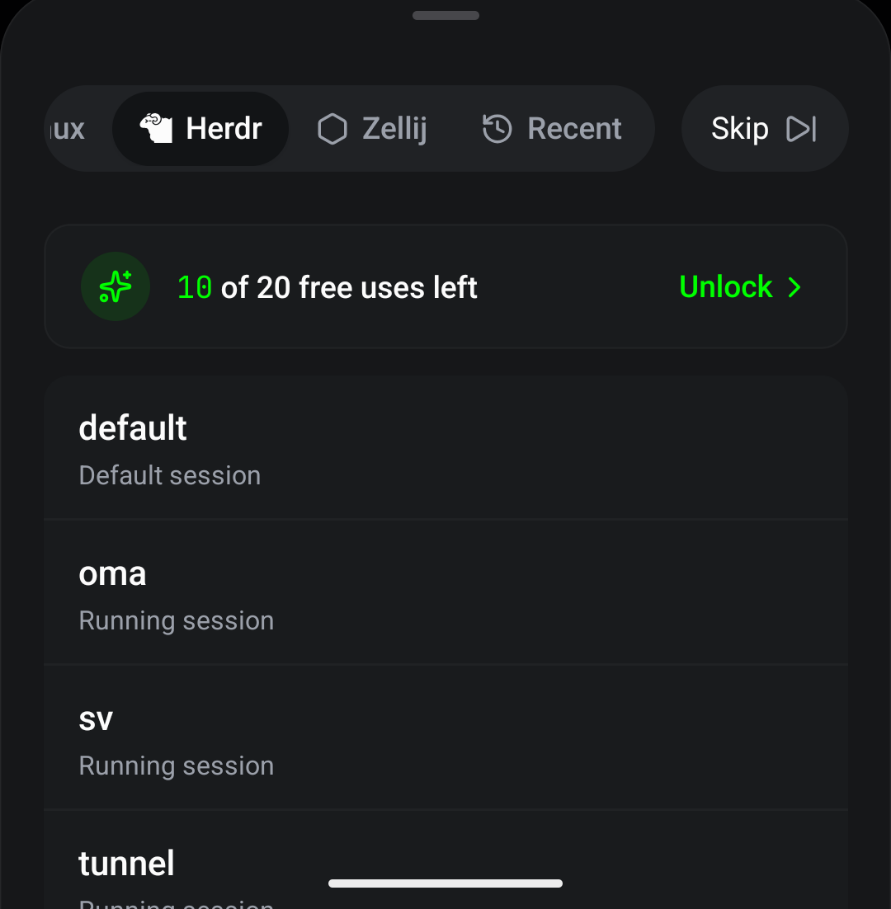
That counter is the part I like least. It is not metering an agent feature; it is the picker over tmux and Herdr sessions already running on my own server. It gives me the ick.
TermRover’s terminal and multiplexer core is free; in Moshi, Mosh and multiplexer integration are paid features. TermRover Pro is optional convenience, not access.
Where Moshi is better
- Agent supervision. Its inbox covers questions, approvals, usage and diffs, including agents that do not run under Herdr. TermRover’s Fleet only shows Herdr status.
- Notifications and approvals. Agent questions reach your phone or watch.
- Review tools. Diff viewer, repository browser and development preview.
- Connection breadth. Experimental ET for networks that block Mosh’s UDP.
- Biometric key protection. Private keys behind Face ID or Touch ID; TermRover locks the app, not key use.
Where TermRover is better
- The terminal comes first. Effort goes into a fast, easy-to-use touch experience; agent features are a side effect.
- Pane-aware selection. Copy one pane, not the whole screen.
- Tailscale without copy-paste. Tailnet import and keyless Tailscale SSH; Moshi has no built-in integration.
- No host daemon. The Fleet reads Herdr over the existing SSH connection; Moshi’s agent layer needs
moshi-hookon every host. - Free where Moshi charges. Mosh, multiplexer controls, Tailscale import, jump hosts and unlimited hosts.
- Cheaper, with no monthly plan.
- Live SSH-to-Mosh switching without losing the session.
Which one should you choose?
Choose TermRover when the terminal is the product: you already use tmux or Herdr, want Mosh without Pro, and prefer no daemon on every host. Choose Moshi when you want an agent-control system.
Testing both is reasonable. TermRover is free to try on iPhone and iPad and Android.
Frequently asked questions
Is TermRover an alternative to Moshi?
Yes, and the more focused terminal. Both run on iOS and Android with Mosh, tmux and agent workflows; Moshi adds a larger monitoring and notification layer.
Does TermRover have pane-aware text selection?
Yes. Long-press a pane in Herdr or tmux with mouse mode on, then drag either handle; the copy stays inside the pane. Moshi documents long-press selection, OSC 52 and tmux copy mode.
Does Moshi require software on my servers?
Only for agent features. Plain SSH, Mosh and jump hosts work without it; the inbox, approvals and usage data need moshi-hook running on every host. TermRover’s Herdr Agents Fleet needs Herdr, which is already running your agents, and installs nothing extra.
Do both apps support Tailscale and jump hosts?
Both support jump hosts. TermRover imports your tailnet with a read-only API key and logs in with keyless Tailscale SSH; Moshi’s docs say it has no built-in Tailscale integration or host picker.
Is Mosh free in both apps?
No. Mosh is in TermRover’s free core; Moshi needs Pro.
Which app is cheaper?
TermRover Pro is $24.99 per year or $79.99 lifetime. Moshi Pro is $7.99 per month, $69.99 per year or $199 lifetime. Both have free tiers.