Releases
TermRover 1.0.8: better touch and richer agent input
TermRover 1.0.8 adds optional double-tap keyboard activation, video uploads, live microphone levels, and a free light theme on iPhone and Android.
TermRover 1.0.8 is about making a mobile terminal easier to steer without the keyboard getting in the way, and making richer input easier to trust. The main changes are an optional double-tap keyboard gesture, video attachments for coding agents, a live microphone meter during dictation, and a free TermRover Light theme.
Tap the terminal without always opening the keyboard
As I have gradually moved more of my own workflow to Herdr, I have spent more time tapping controls drawn inside the terminal. Those taps are real input. I do not want the software keyboard to appear every time I press one of them.
The same problem exists in tmux. Sometimes I only want to switch the active pane with a tap. Raising the keyboard at the same time takes away terminal space and creates another thing to dismiss.
Version 1.0.8 adds Double-tap terminal for keyboard. You can find it under the small gear beside the A- and A+ controls in a live terminal. When it is enabled:
- A single tap remains available to tmux, Herdr, or another terminal app.
- A double-tap toggles the software keyboard.
- The keyboard button in the Quick Row still works whenever you want an explicit control.
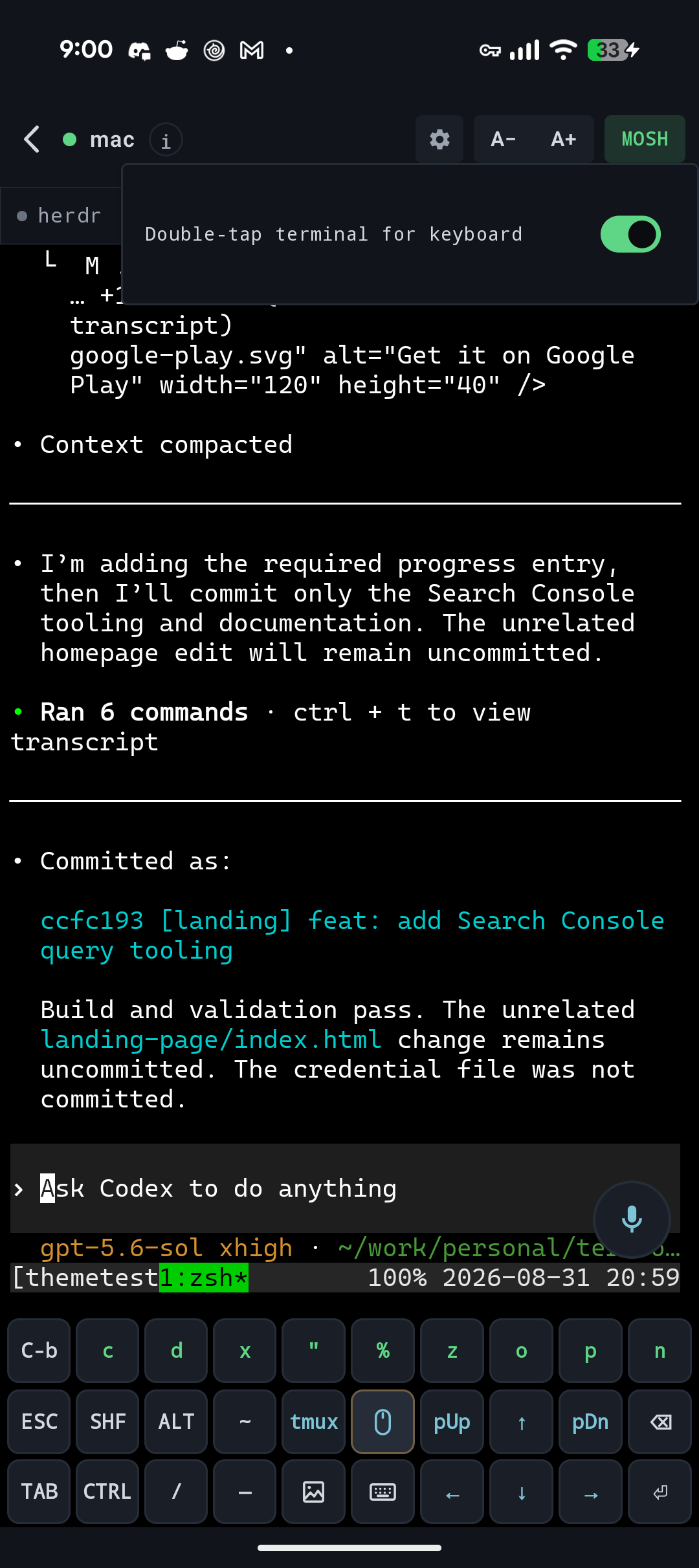
Single-tap remains the default in 1.0.8, so existing behavior does not change unless you choose it. I expect double-tap to become the default in a future release once it has had more time in real workflows.
Send a video when a screenshot cannot explain motion
A screenshot is great for showing what looks wrong. It is much less useful when the problem is an animation, a transition, or a series of actions that only makes sense in order.
TermRover can now attach videos alongside photos. Pick a recording, add a note in the composer, and send it through your existing SSH connection. TermRover uploads the file to ~/.termrover/uploads/ on the remote machine and puts its path into the terminal, so the coding agent can inspect the same recording you just watched on your phone.
Mixed batches can contain up to six photos or videos. Videos get a thumbnail and native preview before sending, and each video can be up to 100 MiB. There is no separate TermRover upload service in the middle: the file travels to your own host over the connection you already opened.
For agent work, this makes a useful loop much shorter: record the behavior, attach the video, say what should change, and let the agent work from the actual sequence instead of a long written reconstruction.
See whether voice dictation is hearing you
Voice dictation is still the quickest way to give a coding agent a detailed prompt from a phone, but a static “listening” label does not tell you whether audio is actually arriving.
Version 1.0.8 adds a live microphone-level meter on both platforms. The segments react to the audio TermRover is receiving, so you can tell the difference between speaking quietly and speaking into a microphone that is not producing input.
Feedback issue #8 is a good example of why that matters. Another Android app was already using the microphone, and TermRover appeared to listen without producing a transcript. The meter does not make Android share a microphone that the operating system has made unavailable, but it removes the silent ambiguity. Together with clearer permission and audio errors, you get a much better indication of whether dictation is working before waiting for text that will never arrive.
A free light theme for work in daylight
Dark terminals are comfortable indoors, but they are not always the best choice outside. TermRover Light is a full light palette for the terminal and app chrome, designed for the days when you are working under the sun rather than in a dark room.
TermRover Light is free on iPhone, iPad, and Android, alongside TermRover Dark and Solarized Dark. Version 1.0.8 also improves how light and dark theme changes are reported through tmux, helping remote applications follow the palette selected on the phone.
Smaller fixes, driven by feedback
There are various reliability and interface improvements throughout 1.0.8 as well. Many of them started with a concrete report from someone using TermRover in a workflow I had not tried myself.
You can follow the remaining reports and fixes in the public TermRover feedback tracker. Specific examples, awkward edge cases, and descriptions of what you expected are especially useful.
Version 1.0.8 is another step toward making a terminal feel at home on a touch device: touch when you want touch, a keyboard when you want to type, richer context for remote agents, and visible feedback when the microphone is listening.