Omarchy
Omarchy terminal text effects on the web
How a Chris Hallas tweet inspired a playful TermRover page using TerminalTextEffects, DHH's Rust TTFX port, WebAssembly, and Omarchy.
Yes, Omarchy’s terminal text effects can run in a browser, and it is amazing to see the real effects come alive outside a terminal. I built a deliberately unnecessary TTFX version of the TermRover homepage with Matrix rain behind the page, a laser writing the headline, and random terminal effects running inside the phone. It is not a redesign or a new product direction. It is just a fun web experiment that became too entertaining to leave on localhost.
The tweet that started it
The idea came from a post by Chris Hallas. Chris took DHH’s Rust implementation of TerminalTextEffects, compiled it to WebAssembly, put it in a Vite project, recreated the feel of Quickshell, and added Figlet. The result was a browser playground for Omarchy screensavers at wte.mdtrr.com.
That was a wonderful chain of software reuse. Someone builds a terminal effects engine. Someone ports it. Someone compiles the port for the browser. Then someone else sees the demo and thinks, “What if my mobile terminal landing page looked like a mildly compromised mainframe?”
So I borrowed the brick and started playing.
I have loved the Omarchy screensaver from the beginning
I use Omarchy every day, and its screensaver has been one of my favorite details from the beginning. The original version powered by TerminalTextEffects made an idle screen feel like part of the desktop’s personality instead of a generic timeout. I especially loved the Matrix effect. Digital rain falling around a huge block-text logo is excessive in exactly the right way.
That history is why Chris’s demo landed so well with me. I already knew the effects from the terminal. Seeing the genuine engine run inside a normal web page, with links, layout, responsive design, and a browser Canvas around it, felt a little impossible even while it was right there on the screen.
The obvious response was to make something with it.
TerminalTextEffects, TTE, and TTFX
TerminalTextEffects, usually shortened to TTE, is ChrisBuilds’ Python terminal visual-effects engine, command-line application, and library. It contains effects such as Matrix, LaserEtch, Beams, Burn, Decrypt, Rain, Waves, and plenty of stranger ones. The project handles the character movement, colors, gradients, animation scenes, and terminal rendering that make the effects feel much richer than a normal ASCII animation.
TTFX is the Rust port published by DHH and Omacom for Omarchy. It is not a loose visual imitation. The project describes itself as a parity-focused translation of TTE, with the same 37 effects and mechanically verified frame output against a pinned version of the Python original. It ships as one fast-starting binary without requiring a Python interpreter at runtime.
The credit chain matters here. TTFX is very explicit that the effects, animation design, and command-line interface came from TerminalTextEffects. Rust changes how the engine is delivered, not who invented the art.
Chris’s web demo made the next jump by compiling that Rust engine to WebAssembly. That means the real effect engine can produce frames in a browser instead of somebody rebuilding Matrix and LaserEtch as vaguely similar CSS animations.
What the TermRover TTFX mode does
For the TermRover TTFX page, I used the WebAssembly build from Chris’s demo and wrapped its terminal frames in a small Canvas renderer. The page keeps the normal TermRover message and product links, then turns the presentation dial much further than good sense normally allows.
There are three live effect surfaces:
- Matrix runs continuously in the background. It fills the browser while the actual page stays inside the same centered 1180px frame as the regular TermRover homepage.
- LaserEtch writes the hero message. The heading is custom block text, the original cyan, purple, orange, and white laser palette is preserved, and the animation rests before drawing again.
- The phone becomes a selectable effects terminal. It keeps the shape and controls of the real TermRover app, with a TTFX-style effect picker and Shuffle switch beneath the phone. Choose one effect to lock it, or leave Shuffle on to keep rotating at random.
The silly visual also created some real browser work. The Canvas output has to stay sharp across different pixel densities, the semantic HTML heading still needs to fit before WebAssembly loads, reduced-motion users need a stable fallback, and the effects must survive a browser Back navigation through the back/forward cache. Fun experiments have an annoying habit of finding production-grade edge cases.
You can open the terminal-effects version of TermRover here. Press R to replay LaserEtch and M to cycle the Matrix background between live, dim, and off.
From TermRover back to Omarchy
The useful part of this story is not really WebAssembly. It is how ideas travel between small pieces of software, and how quickly Omarchy gives those ideas somewhere to go.
TermRover has a tmux session picker because typing prefixes and navigating a terminal-native chooser is awkward on a phone. I wanted the same direct session workflow on my Omarchy desktop, so I wrote Omamux for the Omarchy Quattro bar. It is one of the first plugins I have published for Omarchy, and it is directly inspired by the picker I built for TermRover.
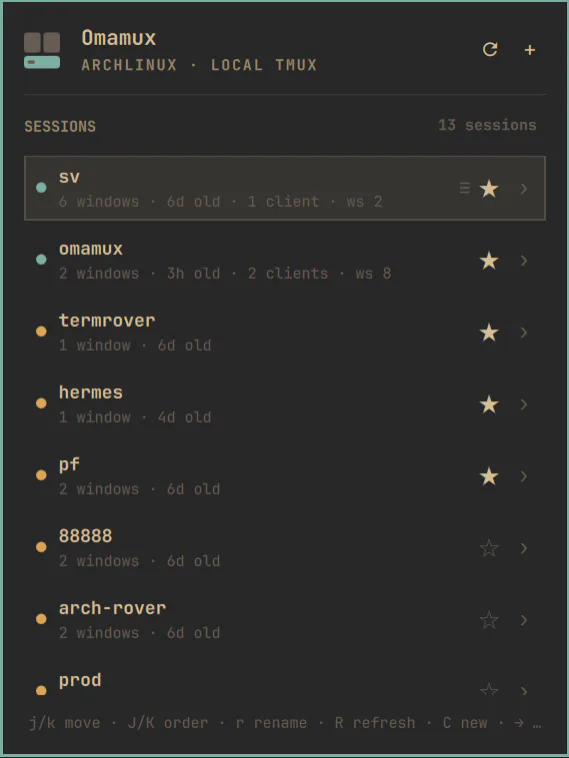
Omamux is a local tmux session picker packaged as a Quattro bar widget. Open it from the bar and you can list, create, rename, favorite, reorder, inspect, and attach to local tmux sessions. It can show the windows and panes inside a session, focus an existing Hyprland terminal instead of opening a duplicate, and keep a favorite after its session exits so you can recreate it later with the same name.
Version 0.1 is deliberately local-only and does not modify your tmux configuration. You can inspect the Omamux source on GitHub or install it through Omarchy:
omarchy plugin add https://github.com/ptgamr/omamux.git --enable
The direction of inspiration is almost symmetrical. TermRover took a desktop tmux workflow and rebuilt it for touch. Omamux took TermRover’s phone-friendly session picker and brought the idea back to the desktop as an Omarchy plugin.
My second published plugin is World Clock for the Omarchy bar, also known as Oma World Clock. It is a keyboard-friendly, DST-correct clock for keeping several places visible and planning across time zones. It has nothing to do with terminal animation, but it comes from the same impulse: find a small daily friction, build a focused Quattro widget, and share it while the idea is still fresh.
That is what makes it fun to take part in the fast-moving movement DHH created around Omarchy. I can enjoy a screensaver, borrow a WebAssembly experiment, publish a tmux picker, and add a world clock without waiting for any of them to become part of one giant application. Omarchy gives all of those small pieces a place to belong.
Software LEGO is more fun when you use it
Chris described Omarchy as a community building LEGO-style bricks of software. This little project is a good example of what that feels like in practice:
- ChrisBuilds made TerminalTextEffects.
- DHH and Omacom translated it into the Rust TTFX binary for Omarchy.
- Chris Hallas compiled TTFX to WebAssembly and built a web playground.
- I turned that playground into a ridiculous alternate TermRover page.
- A separate TermRover idea became Omamux, a Quattro plugin for local tmux sessions.
- Another everyday need became World Clock, my second published Omarchy plugin.
None of these steps needed a committee or a grand platform strategy. Each person found a useful or amusing piece, connected it to something else, credited the source, and delivered a working thing.
That is the whole experiment. I started as an Omarchy user who loved watching Matrix rain across the screensaver. Now I get to add a couple of my own pieces to the same ecosystem, and somehow the screensaver is running on the TermRover website too.
Go make the Matrix rain, then steal the idea responsibly and build another brick.